Post
Run your own AI benchmark: AEON Bench and the Bench Pod
AEON Bench measures any open model's quality and real speed on your own hardware, signs the result and ranks it with its exact recipe. Why a stranger's score can be trusted, how to read the boards, and the five steps to a first run.
14 min read
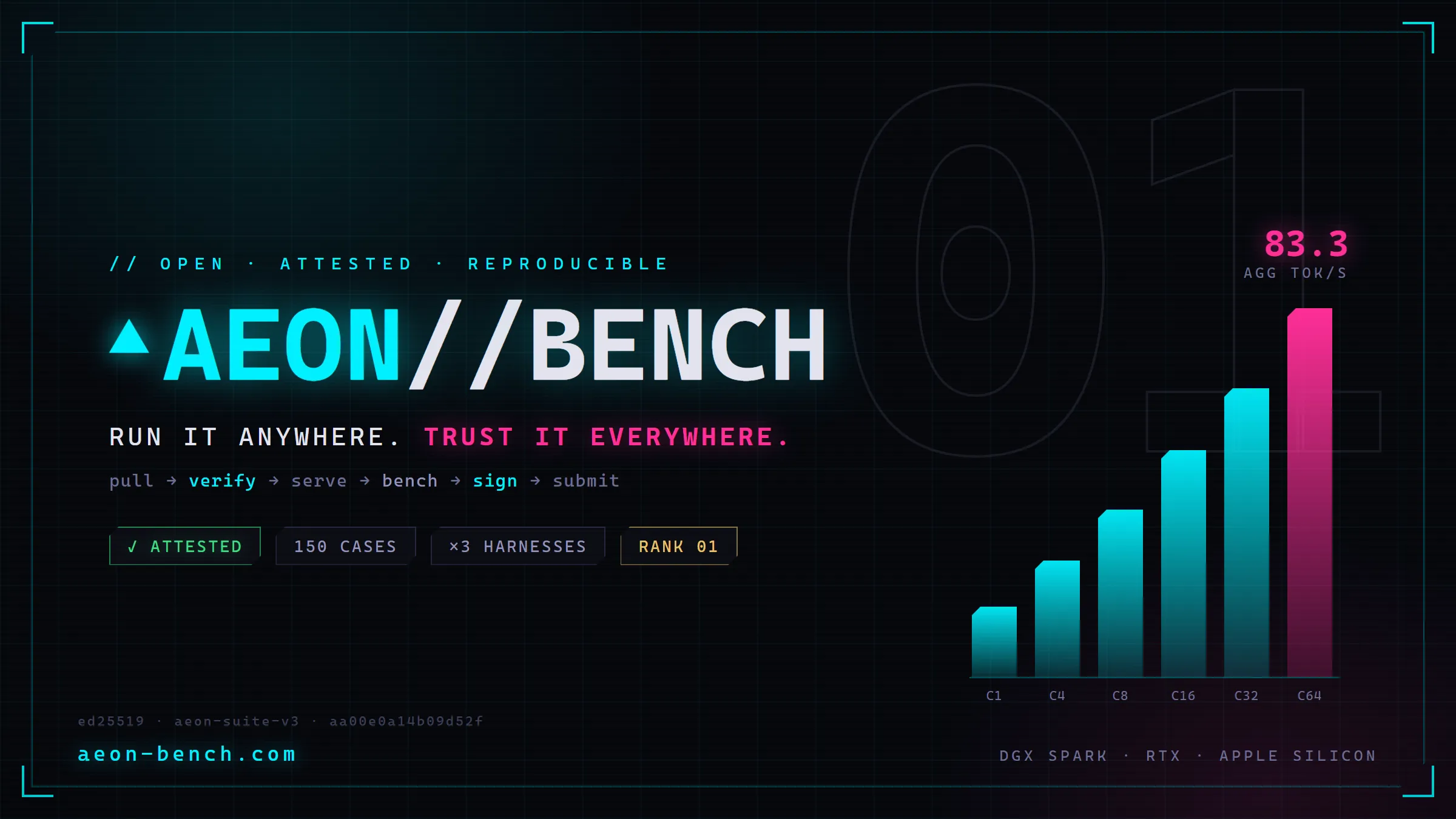
People keep asking two things: is this model actually good, and how fast will it run on the machine I own. The numbers on offer came from the labs that made the models, on hardware most of us do not have, through a harness nobody outside the lab could inspect.
AEON Bench is my answer: an open benchmark framework for local AI models, with a public leaderboard at aeon-bench.com. The Bench Pod is the Docker container that does the work on your own computer. It pulls a model, checks every weight file against Hugging Face, serves it, runs the full exam, signs the result with a device key and submits it, and a validated result ranks on the public board with the exact serve recipe, engine, flags, hardware and weights hash attached, so anyone can reproduce it. I think of it as a certified dyno for AI models. The pod is open source under the MIT license.
The problem with a published score
Three things go wrong with a benchmark number you did not run yourself, and they compound.
The first is hardware: a score measured in a lab says nothing about the speed you will see. The second is the harness. A modern model does much of its useful work as an agent, calling tools and editing files, and it does that inside a harness, the program that turns the model's text into actions. The same model can score 87 in one agent harness and 37 in another, and a single published number hides which one was used. The third is the serving setup: open models run on many engines with dozens of flags, and the flags change the result.
I learned the third one the hard way. The single most common way a benchmark goes wrong is the tool-call parser. The model emits perfectly good tool calls, the server fails to convert them into the form the harness expects, and the agentic score lands near zero. One of my own god-mode runs sat pinned at 2.4 on all three harnesses before I understood that. A wrong parser looks exactly like an incapable model, so the pod now reads the model's chat template, tests tool calling before the long suite starts, and prints the exact flag to fix under the message WRONG TOOL-CALL PARSER.
Everything about the bench follows from those three failures: measure on the reader's hardware, measure through real harnesses and name them, and record the whole serving recipe so the result can be run again.
It tests the whole model, at every difficulty
A full validated run on AEON Bench measures seven dimensions. The text suite covers five categories, Math, Instruction, Reasoning, Coding and Prose, across six difficulty tiers. The agentic suite runs environment-execution tasks through three real coding-agent harnesses, scored on what actually lands in the files. Vision, audio and video have their own probe-gated suites, 31, 21 and 10 deterministic cases respectively, run only when the model advertises the capability. The generative arena asks for apps, games and animations from seeded prompts, and the playable artifacts ship inside the signed bundle. The performance grid measures speed. Each dimension gets its own board, and the composite ranks the whole, so a model that writes beautiful prose and cannot drive a tool shows up as exactly that.
The six tiers run from easy up through expert and frontier, and the spread matters in both directions. A small model is not shamed by questions it was never going to answer, because its lower tiers stand on their own, and a large model is not flattered by a ceiling it hit on page one, because the frontier tier keeps separating the strong from the very strong. A scope selector runs only the hard tiers, and a tier-scoped run gets its own board. Beyond frontier there is a god-mode preset with its own board; it is a different exam and ranks only against itself.
Three real harnesses, named and versioned
The agentic portion is 30% of the composite score, and it is the part that most needed to be real, because a multiple-choice proxy for agent skill would have been cheaper and easier to compare. It would not have measured the thing people care about. So the pod builds three independent coding-agent harnesses on your machine, straight from upstream, each in a fresh container, and hands each one the same tasks. The harness versions float to the latest release at build time and are disclosed on every result, because a score through last month's harness is a different score.
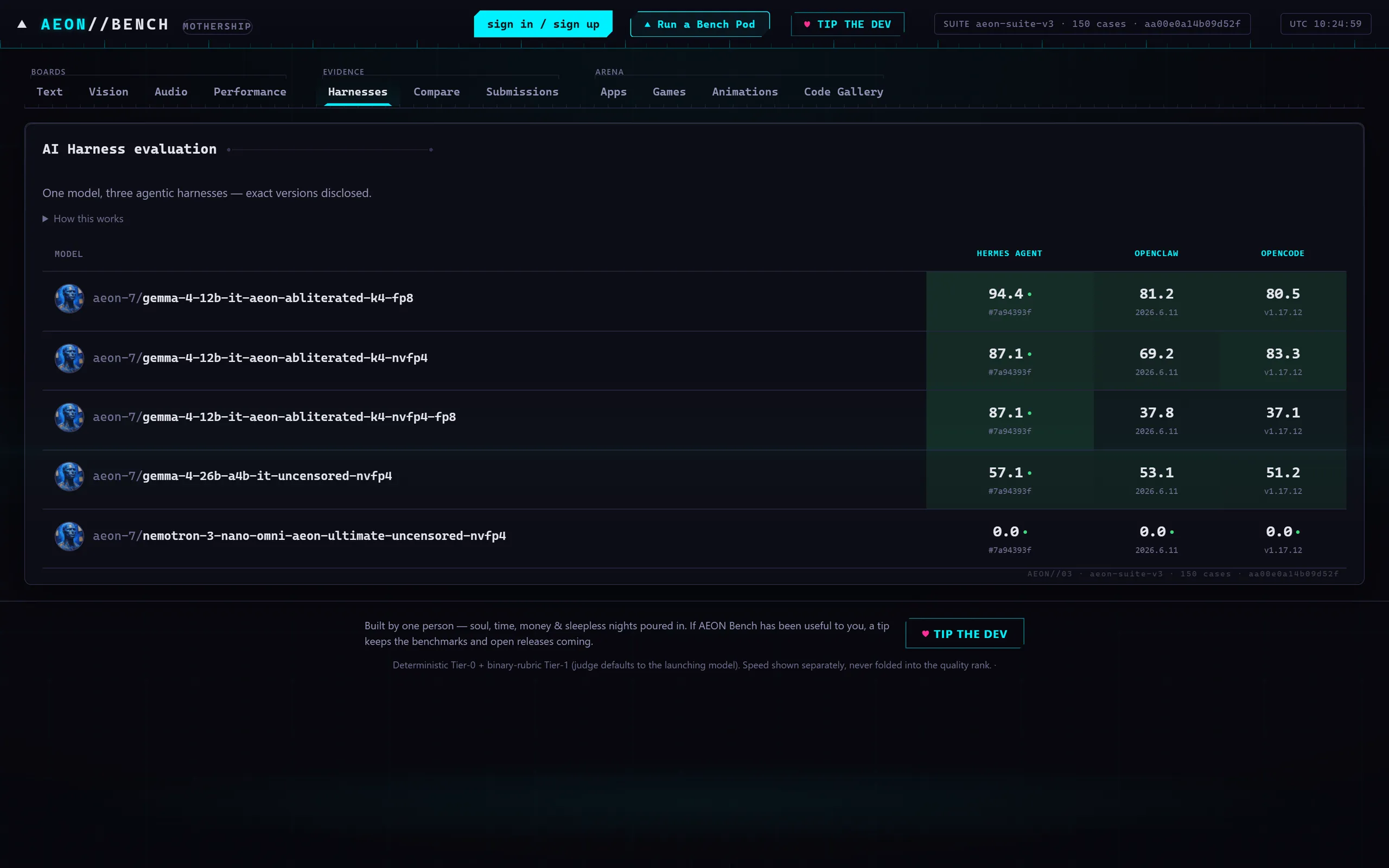
The board shows the per-harness scores side by side rather than averaging them away. If the agentic part cannot run at all on your machine, your result still ranks on everything it did measure, badged "agentic untested" with instructions to fix it. A partial honest result beats no result.
Honest speed, with the recipe attached
The bench reports four speed boards: peak aggregate tokens per second, single-stream tokens per second, time to first token (TTFT) and time per output token (TPOT), each with crowns per hardware class so a laptop is not compared with a rack. Peak aggregate is the multi-user story, the total a server can push when many requests arrive at once. Single-stream is how fast a chat feels to one person. TTFT is the wait before the first word appears.
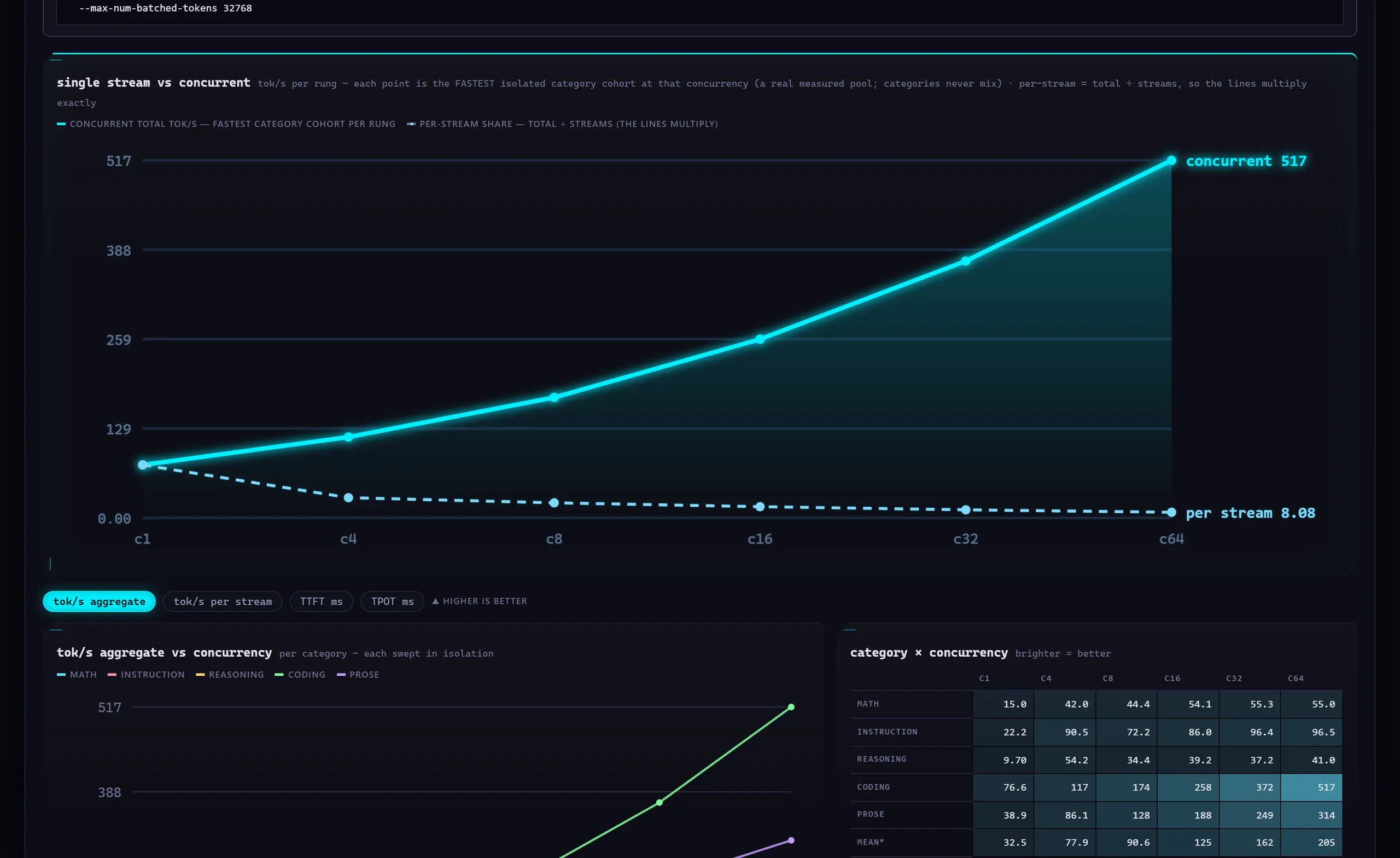
The pod measures these across a concurrency ladder, by default 1, 4, 8, 16 and 32 simultaneous streams, with a flag to go higher. Every speed number carries the serve recipe that produced it, because speed without flags is a rumor.
That recipe is the feature I did not plan and now consider the point. Every validated run carries its exact docker command, engine version, flags, verified weights hash as repo@revision and detected hardware, so the leaderboard doubles as a recipe discovery tool. Find your hardware class and the fastest run for the model you want, and the board hands you the recipe that produced it; the Run tab's Template picker restores the recipe of a prior run. Nobody has to trust my tuning notes. The settings are the result.
Why a stranger's score can be trusted
A public board full of self-submitted numbers is only as honest as its worst submitter, so the trust model is deliberately boring and layered.
The first layer is hashes. Before anything is served, the pod verifies every weight file against Hugging Face using the SHA-256 checksums that Git LFS stores for each large file, together with the repository manifest. A WEIGHTS VERIFICATION FAILED stop is the pod doing its job. The result records the exact repo@revision that was tested, so "this model" means those bytes.
The second is a controlled pipeline. The sequence is fixed: pull, verify, serve with a recorded recipe, benchmark, sign, submit. The serve wiring is protected so that the model under test is the model that answers.
The third is signed bundles. Every pod holds a private ed25519 device key, a standard digital-signature key. When it submits, it signs the whole result bundle, and the board re-verifies the signed bundle.
The fourth is tiers. Only attested runs, shown on the site as verified, rank. A self_reported run, shown as local, covers an endpoint the pod could not weight-verify; it is stored for your own use and never ranks, and a raw endpoint run with no Hugging Face link can never rank. A server you already run can still be attested: pass the Hugging Face link, the serve URL and a verify-endpoint flag. Partial runs, whether fast, limited, tier-scoped or single-category, never rank as validated, and a run that covers under 90% of the suite drops off the board.
The limit is worth stating plainly. Software signing cannot prove that a modified host is honest; hardware attestation through a TPM or a trusted execution environment exists in the design only and is not built; an API-served model gives identity of claim, not identity of bytes. Within those limits the board keeps the promise of a dyno sheet: the same test, on the stated machine, gives the stated number.
How to read the boards
Open a result and the top line is the composite score, with one bar per text category beneath it and the aggregate tokens per second beside it. A model on a DGX Spark posting 65.8, an example figure, tells you its overall standing; the bars tell you whether that is a strong coder with weak prose or the reverse.
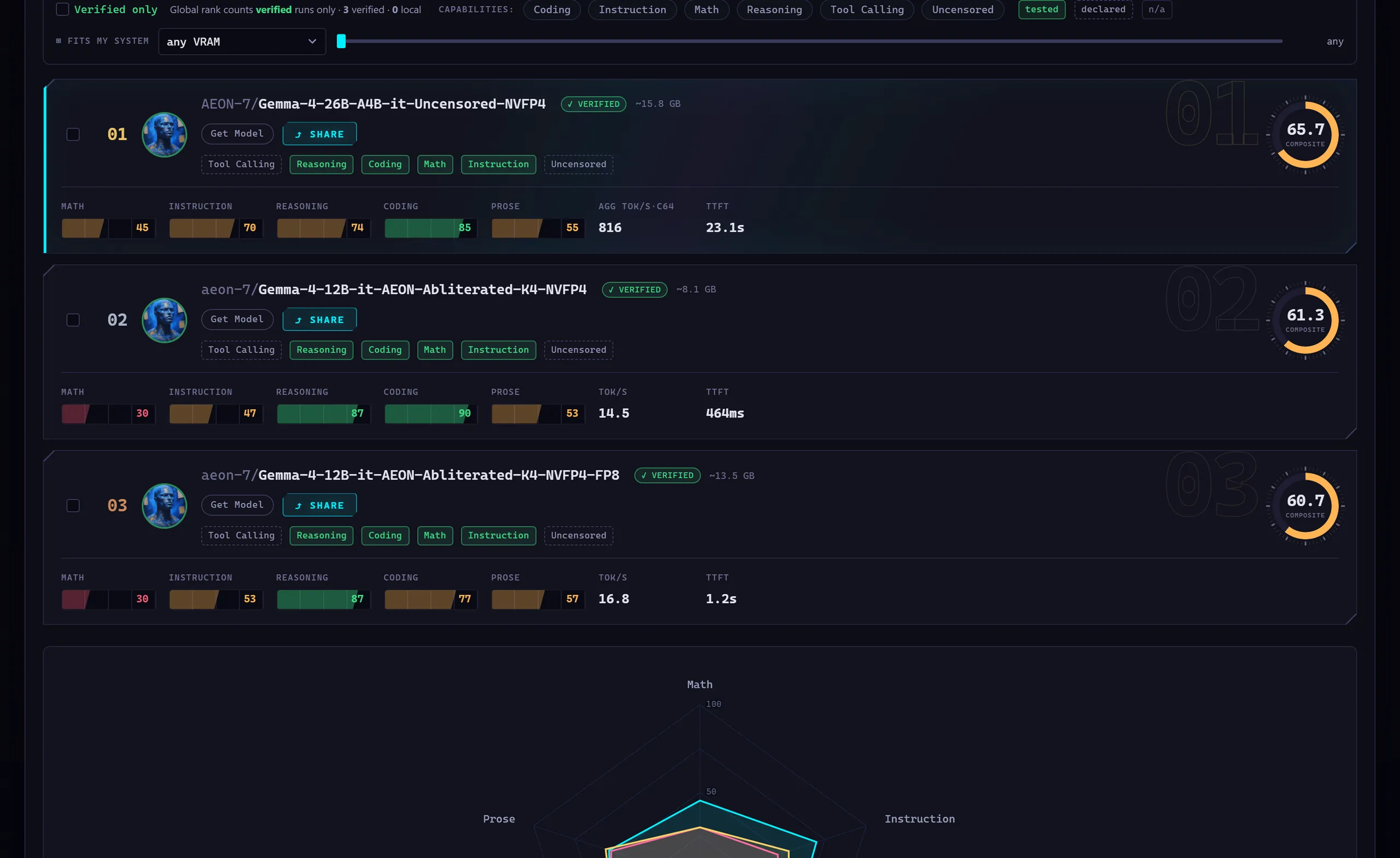
Beneath that come the agentic and performance views, and the gallery. The gallery is the part I find myself showing people first: every app, game and animation the model built during the arena, with a live preview and the source, so you can play what it made instead of reading a rubric about it.
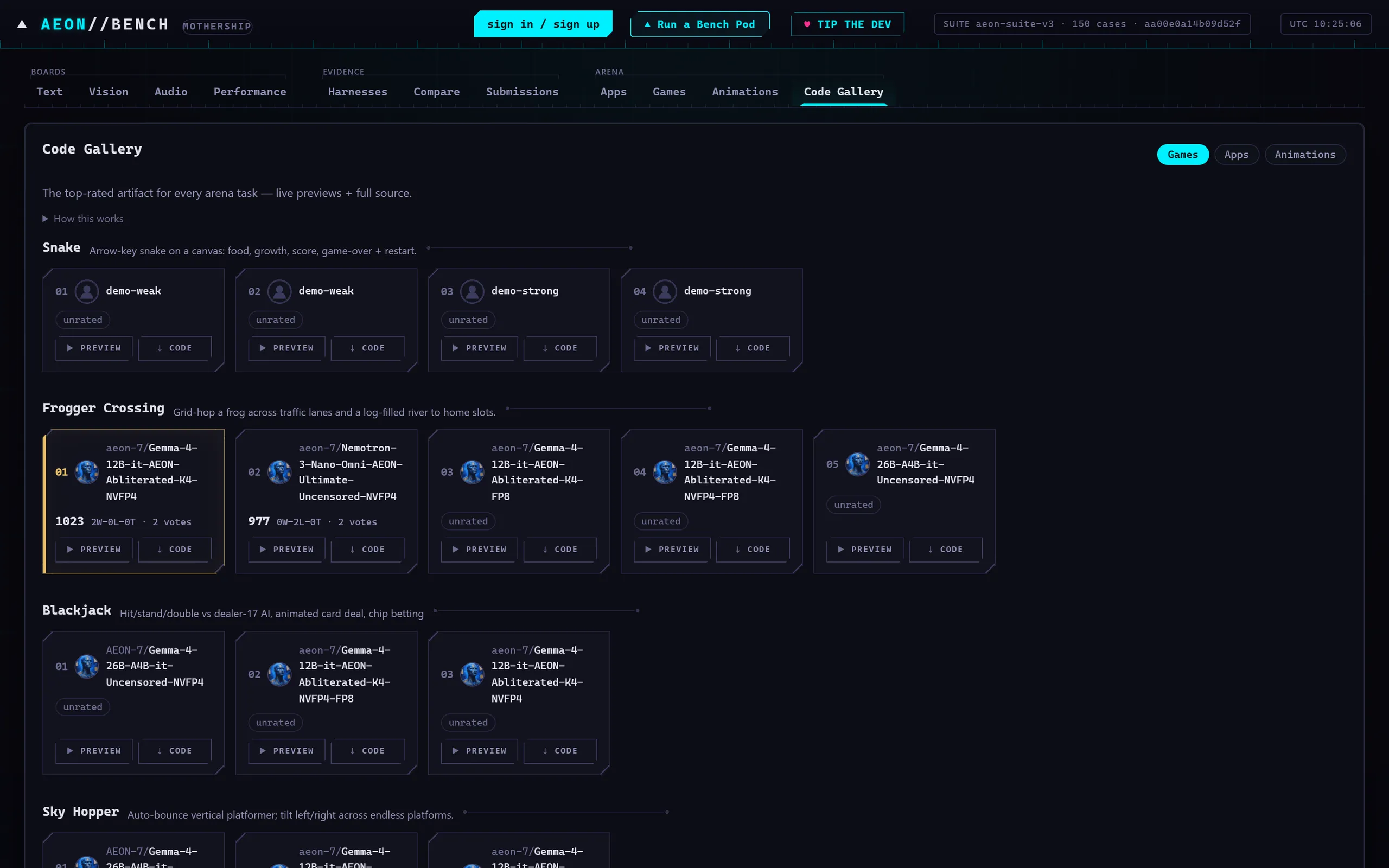
Two reading habits keep you honest. Compare like with like: the hardware class filter exists so that a laptop recipe and a workstation recipe are not read as the same contest. And compare same budget to same budget: the token and time budgets of every run are recorded, and a run with smaller budgets is a different, usually harsher, exam.
What you need
You need Docker, with the Docker socket mounted into the pod, because the pod starts the model server and the harness containers as siblings; a missing socket is the most common cause of a zero agentic score. On an NVIDIA machine you also need the NVIDIA Container Toolkit so that --gpus all works; without it the pod sees a CPU-only box, the fast CUDA engines turn themselves off and your hardware is mislabeled on the result. Plan on about 10 GB of free disk for the harness images, roughly 3 GB each, plus the model, and outbound network to the container registries, github.com, pypi.org and registry.npmjs.org for the first harness build. A Hugging Face token is needed only for gated repositories; it is saved once and stored only on the pod.
The pod picks an engine for your platform. On a DGX Spark the default is AEON vLLM Ultimate, my own build of vLLM for the GB10, described in its own article. On x86 CUDA the default is plain vLLM, and I recommend the Ultimate image there too. AMD cards get the ROCm build of vLLM, GGUF files and CPU-only boxes get llama.cpp, and bare Windows uses LM Studio. On a Mac the pod recommends MLX, Apple's framework for its own silicon; macOS cannot run MLX inside a container, so the Run tab hands you the bare-metal command (pip install mlx-lm once, then the generated mlx_lm.server line), waits for the endpoint, benches it and records that recipe exactly like a docker one.
Five easy steps
Step one, start the pod. On an NVIDIA PC or server, this one line does it:
Code, shelldocker run -d --name aeon-pod --network host --gpus all -v /var/run/docker.sock:/var/run/docker.sock -v aeon-pod-state:/root/.aeon -v "$HOME/aeon-models:/models" -e AEON_MODELS_HOST_DIR="$HOME/aeon-models" ghcr.io/aeon-7/aeon-pod:latestOn a Mac with Apple silicon, drop --gpus all and publish the port instead:
Code, shelldocker run -d --name aeon-pod -p 8091:8091 -v /var/run/docker.sock:/var/run/docker.sock -v aeon-pod-state:/root/.aeon -v "$HOME/aeon-models:/models" -e AEON_MODELS_HOST_DIR="$HOME/aeon-models" ghcr.io/aeon-7/aeon-pod:latestThe quick-start popup on the site shows the same two commands. To let the system scan find models already in a Hugging Face cache or an LM Studio folder, add the read-only home mount from the README, -v "$HOME:/host-home:ro" -e AEON_HOST_HOME_DIR="$HOME", to whichever line you use. If port 8091 is taken, add -e AEON_PORT=8092.
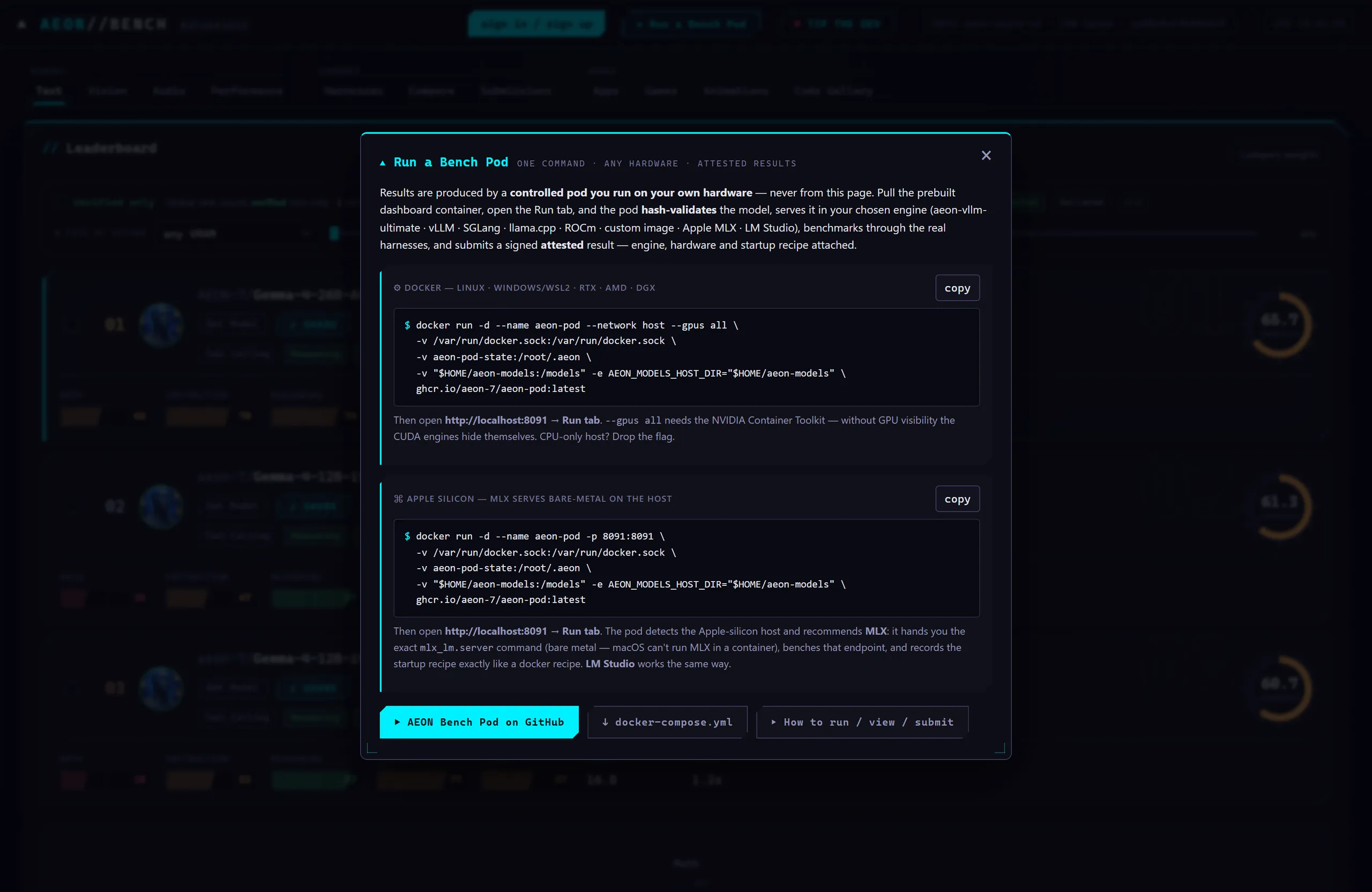
Step two, open http://localhost:8091 and click the Run tab.
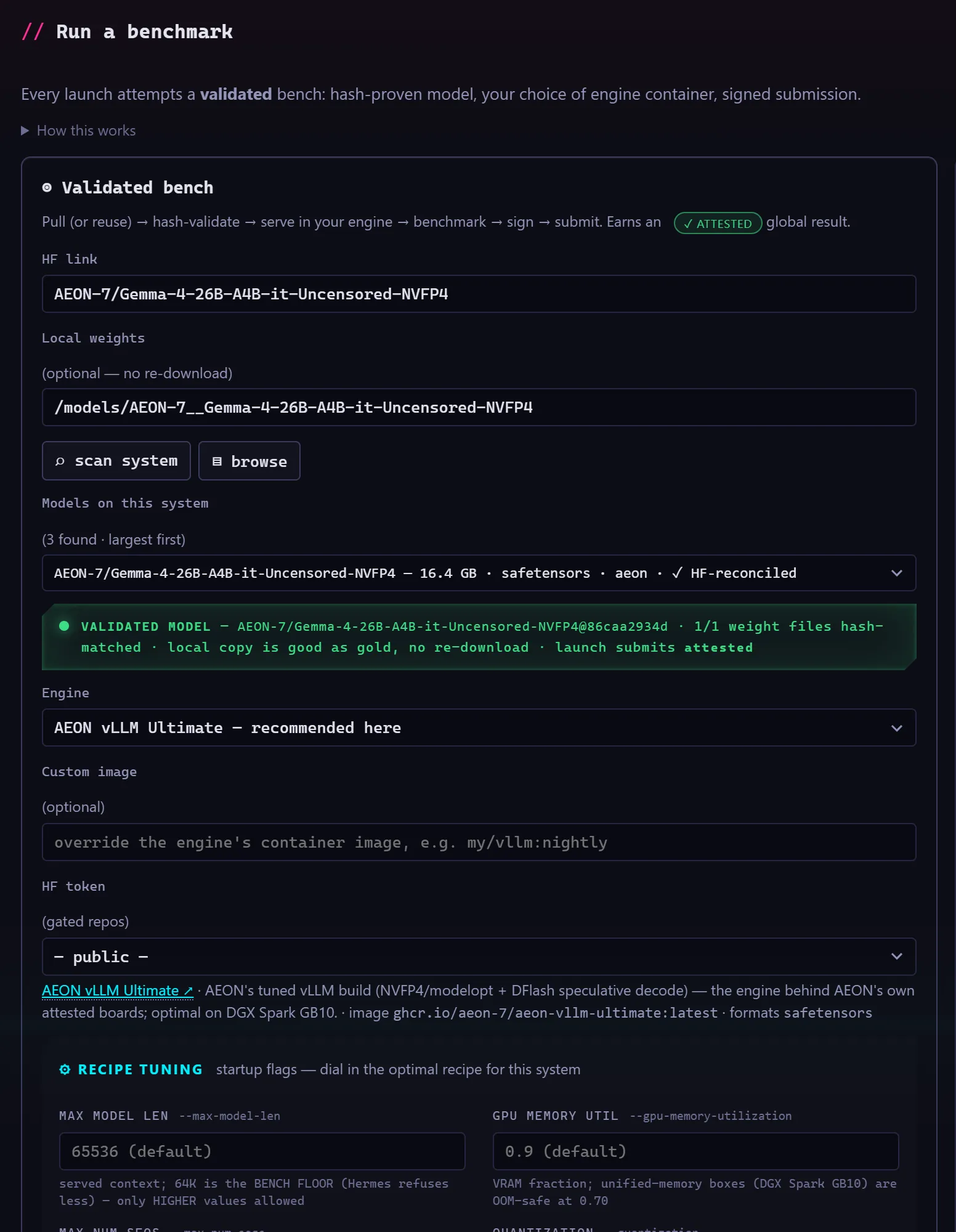
Step three, paste a Hugging Face link, for example AEON-7/Gemma-4-26B-A4B-it-Uncensored-NVFP4, or click scan system to pick a model already on disk. Either way the weights are hash-checked against Hugging Face before anything runs, and a model already on disk is checked in place.
Step four, wait for the green VALIDATED MODEL light, leave Test plan set to Comprehensive, and click Launch validated bench. Comprehensive is the preset that ranks; Text suite only is a quick quality-only plan that does not.
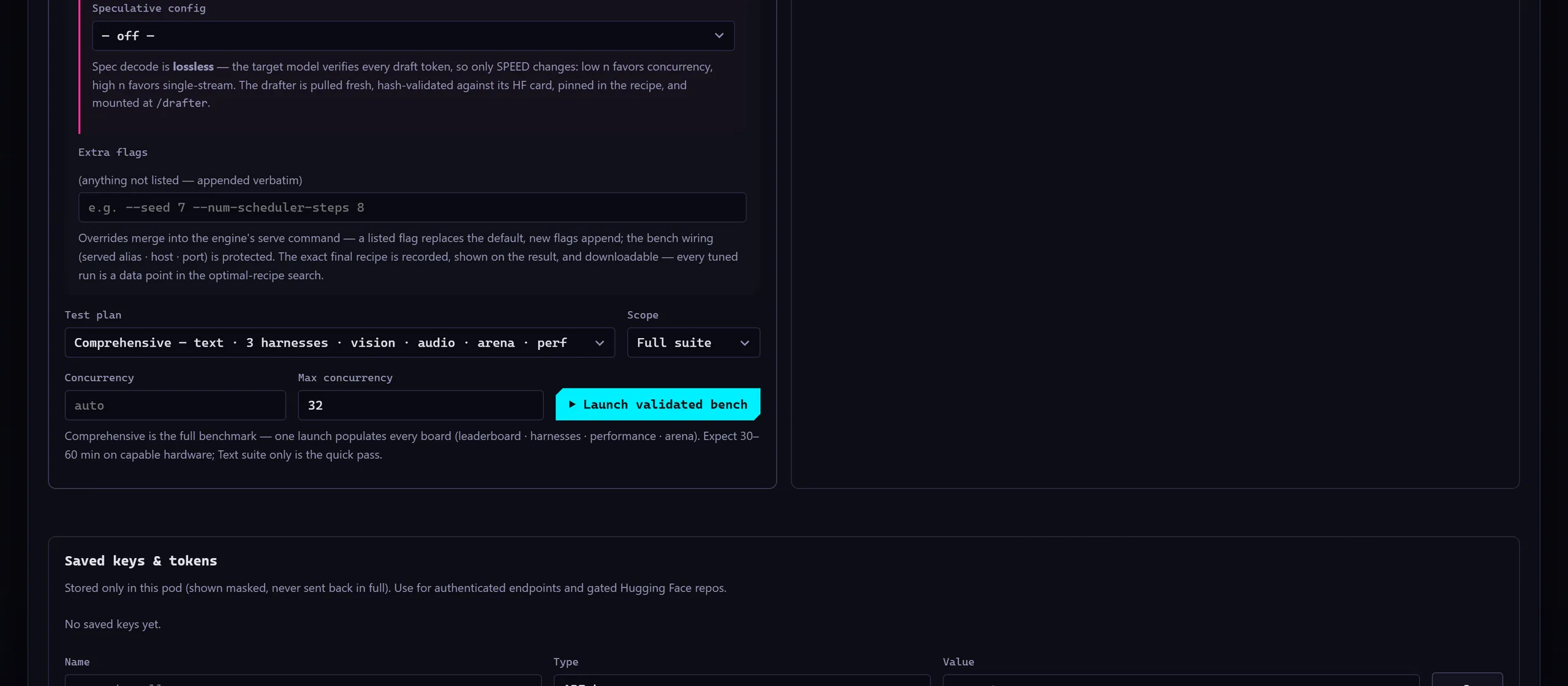
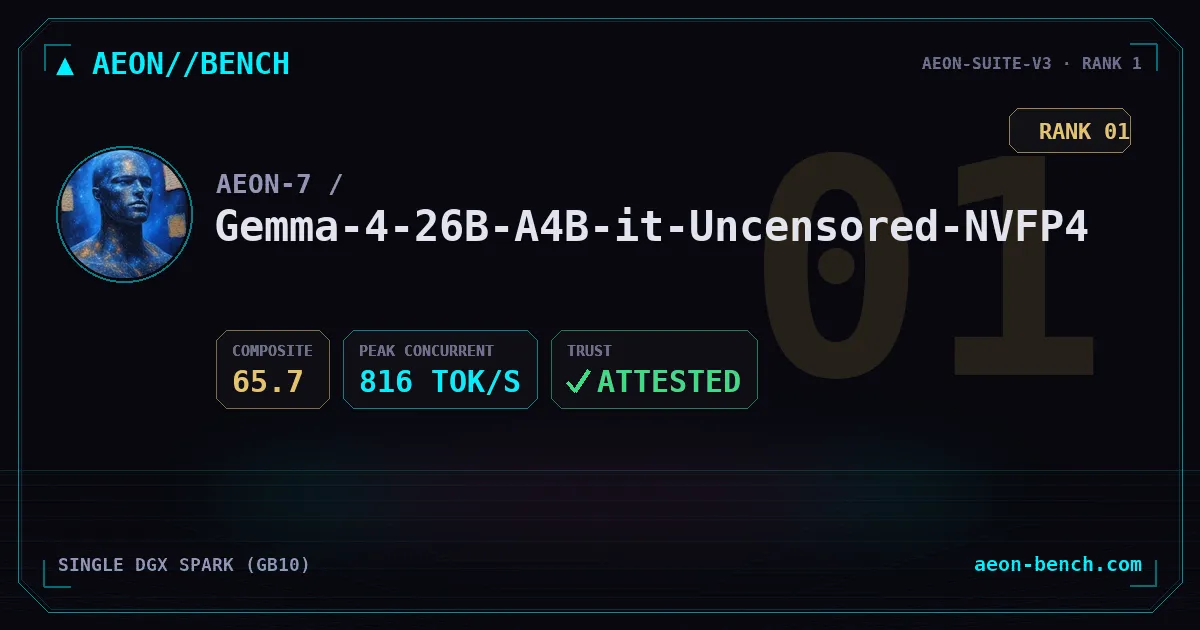
Step five, wait. The Live tab streams every case as it runs. On capable hardware a comprehensive run takes roughly 30 to 60 minutes; large models take hours, and the first run on a new machine is the slow one, because the three harness images are built from upstream and then cached. Do not kill a slow run. When it finishes, the result is signed, submitted and on the board, and the pod generates a share card for it.
To update later, pull the new image, remove the old container and run your run line again. The device key, past runs and models live in named volumes and survive the update; the docker run flags do not, so carry any extra -e flags into the new line.
Code, shelldocker pull ghcr.io/aeon-7/aeon-pod:latest
docker rm -f aeon-podGive the bench the box to itself: another container holding the GPU silently enters the number, and a restart policy or a supervisor can resurrect a container you thought you had stopped.
The power-user path, in brief
Everything above runs on the recommended recipe for your hardware. The Run tab also opens a recipe tuning catalog: every engine flag is a labeled card with pros, cons and warnings, a Template picker restores the exact recipe of any prior run, and an Extra flags box passes anything else verbatim. The detailed tuning story is the companion article, the AEON Bench recipe lab.
A handful of flags do most of the work. --gpu-memory-utilization is the fraction of GPU memory the engine may claim; on unified-memory machines like the Spark, 0.6 to 0.7 is right and anything above about 0.8 hard-hangs the box, while discrete cards can go to 0.9 and higher. --max-num-seqs is the concurrency ceiling, and it must agree with the perf ladder's ceiling, --perf-max-conc, or the top rung measures queueing instead of the server. --tool-call-parser needs --enable-auto-tool-choice beside it. The pod enforces a 64K context length on the serve because the agent harnesses need it. Quantized cards have their own rule: NVFP4, the 4-bit floating-point weight format for Blackwell GPUs, needs --quantization modelopt, and the serve block on the model card is the first thing to read.
Speculative decoding and a reference run
Speculative decoding is the one upgrade that costs nothing in quality. A small drafter guesses several tokens ahead and the main model verifies them in one pass, so the output is identical and only the speed changes. The pod supports two forms, mutually exclusive. MTP, multi-token prediction, is built into models that ship with it and needs no drafter. DFlash mounts a separate drafter card at /drafter, hash-validated like the model, with a draft length from 1 to 15, where 6 is the concurrent baseline and 11 or 12 is the single-stream maximum. On the Spark, serving a 26B Gemma in NVFP4 with a tuned recipe and a DFlash drafter, a quality run sustained 816 tokens per second aggregate at 64 streams, an isolated perf sweep of the coding cohort reached 517, a single stream ran at 77, and the drafter's mean acceptance length was 4.77 tokens. I go deeper on drafters in DFlash with a 35B Qwen and DDTree on vLLM.
One caution for slow models: undersized budgets delete the evidence, since text cases become no-answers and timed-out agentic tasks fall out of the mean and inflate it. --think-budget is not a smaller max-tokens; it closes the thinking block early and changes what is measured, so leave it off for a ranked run.
The whole pipeline is also one command inside the container:
Code, shelldocker exec -w /app/mvp aeon-pod python -m pod.aeon_pod --hf-link org/ModelThe pod also ships an MCP server, and the repository's AGENTS.md is written so that an AI agent can deploy the pod and run the whole job for you. Whatever path you take, the result is the same: a signed, reproducible number on hardware you own, with the recipe attached. The rest of my library is in the catalog.
Sources
More like this
- Magick Orb Docker: the headless Orb for any server
One docker run puts the headless Magick Orb on an x86 server, a Mac or a DGX Spark: Model Share over IPFS, the Agent Dashboard, MCP and REST, with no Raspberry Pi. What the container lacks versus the Pi, and why port 4001 matters.
The Aeon Forge6 min read - AEON vLLM Ultimate: one serving image for the DGX Spark
AEON vLLM Ultimate is vLLM built from source for the DGX Spark's GB10 and shipped as one 18.3 GB image that serves the whole AEON fleet with speculative decoding and NVFP4 weights. Here is why it exists, what broke on the way, and how to pull and run it.
The Aeon Forge14 min read - AEON Bench recipe lab: tuning vLLM flags one at a time on a DGX Spark
The AEON Bench recipe lab treats a serve recipe as an experiment: change one flag, bench, read the curve. The knobs in order of effect, the speculative decoding trap behind 33 versus 517 tok/s on a DGX Spark, the 816 tok/s recipe to steal, and four traps that fake a result.
The Aeon Forge11 min read - The AEON Forge catalog: every project and what to read first
A guided tour of the AEON Forge catalog: NVFP4 models for the DGX Spark, MLX builds for Apple Silicon, the voice stack, the media tools, the Orb and the Bench, with the article to read first in each group.
The Aeon Forge11 min read - Qwen3-TTS server: streaming speech that starts in 0.4 seconds
An OpenAI-compatible Qwen3-TTS server for the DGX Spark that streams audio while the GPU is still generating: first audio in about 0.4 s, voice design and voice cloning loaded side by side, a voices library endpoint, and the version drift to check before you deploy.
The Aeon Forge8 min read